Clarity AI Service Summary
The # Clarity AI Service Summary offers a revolutionary new Care workflow as part of the Clarity enhancement to Mosaic One. Available from the Care Subscriber Details page, this feature allows the user to at a glance see a conversational rollup of all issues on a given service, the root causes leading to these symptomatic issues, and any actions the user can take to remedy them.
Accessing the AI Service Summary
- Sign in to Mosaic One.
- Navigate to Care.
- Navigate to any Care subscriber using Care Search.
Report Sections
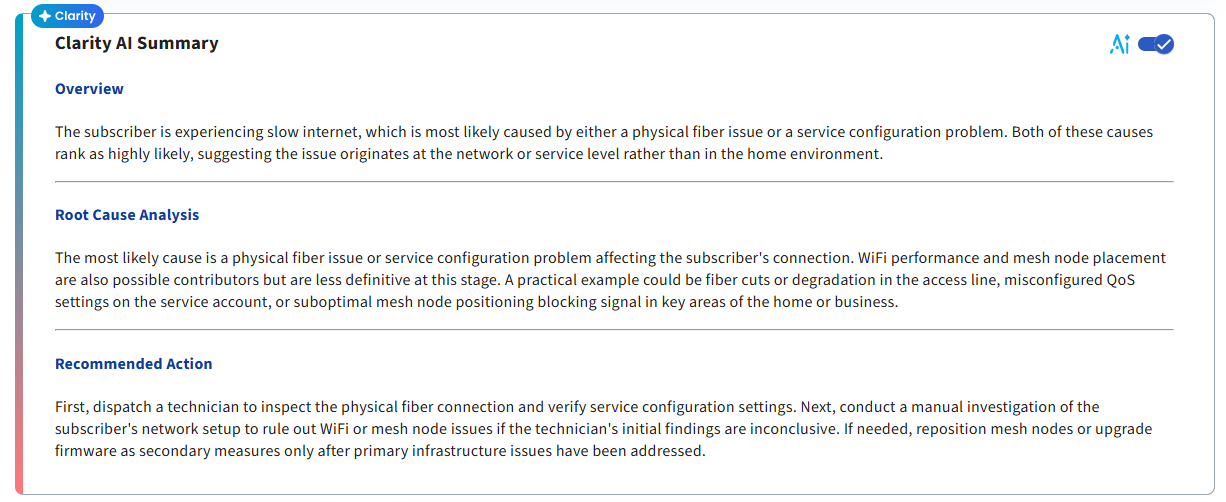
The Clarity AI Service Summary is organized into three main sections: Overview, Root Cause Analysis, and Recommended Action.
Overview
The Overview section provides a high‑level summary of this service's current status. This includes their current status and any issues they might have. This section helps users quickly understand the state of a service and quickly get up to speed to help resolve the issue as soon as possible.
Root Cause Analysis
The Root Cause Analysis section leverages AI and expert-generated insights to help determine the true root cause of the service's problems. This allows the user to be able to focus on one individual item, rather than parsing through 5 individual symptomatic issues.
Recommended Action
The Recommended Action section analyzes the root cause and all the data we have provided to determine the top action (or actions) that would best help solve this service's problems.
Data Sources
The Clarity AI Service Summary considers all of Care's real time subscriber data from our Active Issues, as well as Operate's ONU level insights, and our proprietary Wi-Fi issues for Intellifi enabled services. All of these data points are then analyzed by our REAL AI Factory to generate the summary.
Clarity Preview Availability
The Clarity AI Service Summary is available as part of the Clarity enhancement to Mosaic One. By default, all tenants will see a Preview version of Clarity functionality populated with example data. This allows users to explore the features of the summary prior to fully enabling Clarity capabilities.
Enabling Full Clarity Capabilities
To learn more about Clarity or to explore enabling full functionality with live data, please contact your Adtran sales representative for additional information.