Router Tab
Select the Router tab to display the following information regarding the subscriber's gateway device:
note
Most of the router information requires that the subscriber exists in an in-home management software such as Intellifi, Plume, or Device Manager.
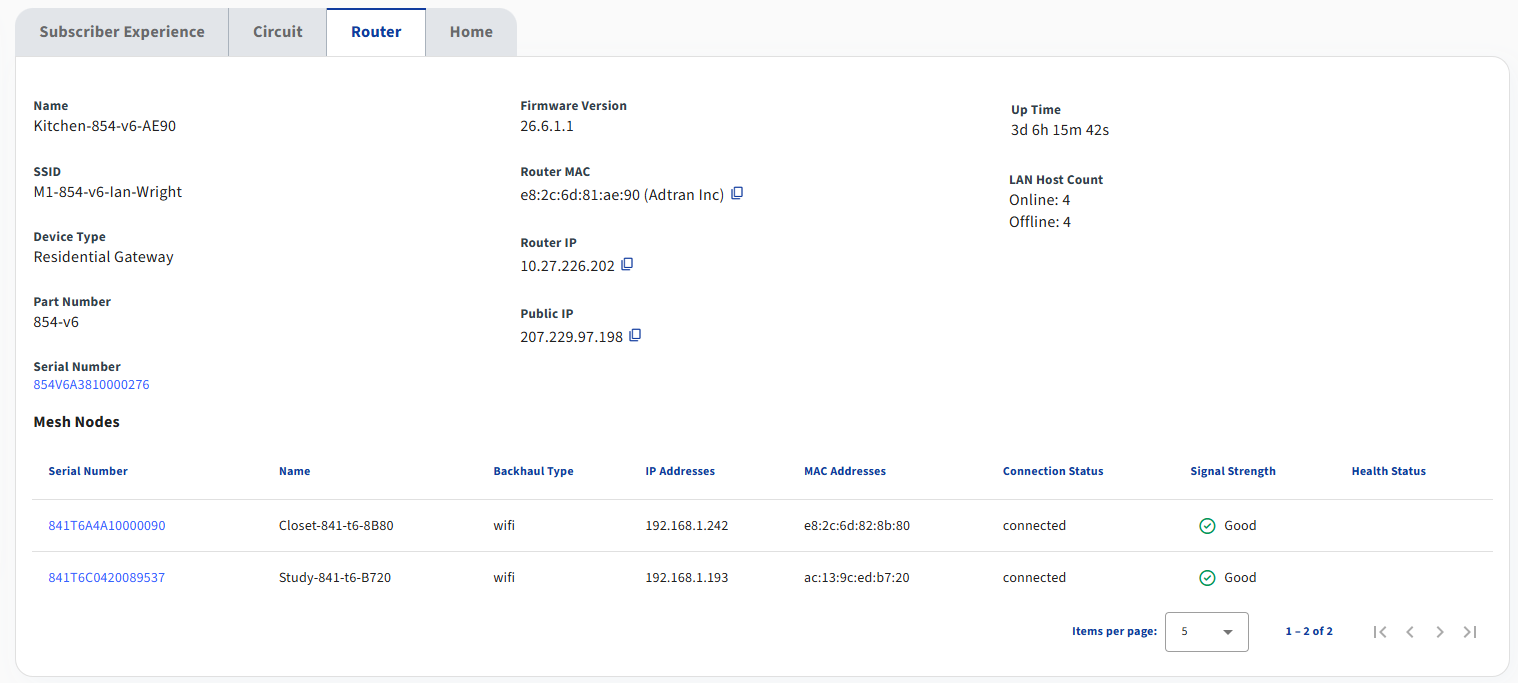
| Field Name | Description |
|---|---|
| Name | The name of the gateway device. This field is only present for Intellifi and Plume managed services. |
| SSID | The identifier of the gateway's wifi network. |
| Device Type | The type of device serving the subscriber's service. |
| Part Number | The part number of the device. |
| Serial Number | The serial number of the device. This field is a deep link for Intellifi and Plume managed services. |
| Firmware Version | The firmware version that is loaded on the device. |
| Router MAC | The WAN MAC of the router. |
| Router IP | The WAN IP of the router acquired through DHCP or similar processes. |
| Public IP | The public-facing IP of the router as it connects to the cloud. This is many times different from the Router IP in carrier grade NAT deployments. |
| Last Active | Shows how long ago the device made contact with the cloud. This field is only present for Device Manager managed services. |
| Up Time | Shows how long the device has been up. |
| LAN Host Count | Shows the total number of online and offline LAN hosts on the subscriber's network. |
| Mesh Nodes | The Mesh Nodes table shows similar fields as described above for each mesh device. The Signal Strength column in this table describes the uplink quality of each mesh device. |