Subscriber Information
The first area in the upper left displays the subscriber's information, including the subscriber name, street address, account number, and more. This area also includes an experience rating indicating the overall health of the subscriber. Issues appearing in the Active Issues Table will cause this rating to go from Good to Fair or Poor, depending on severity. In general, Fair means the subscriber still has service, but could be experiencing issues that degrade that service. Poor means the subscriber may or may not have service, and will require assistance to fix the issue.
A pin icon is displayed next to the subscriber name. Clicking on this icon will add a subscriber to the Pinned Subscribers table which can be accessed from the Care Search page. Likewise, clicking on this icon again will remove the subscriber from the Pinned Subscribers table.
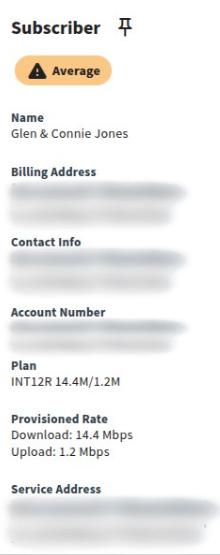
| Field Name | Description |
|---|---|
| Name | Subscriber first and last name. |
| Billing Address | Address associated with account billing. |
| Contact Info | Contact information such as phone number and email address. |
| Account Number | Subscriber Account Number as entered by the provider in the Mosaic Subscriber Insights application. |
| Plan | The billing speed package associated with this subscriber. |
| Provisioned Rate | The provisioned rate of the subscriber's service. |
| Service Address | Physical street address where the subscriber is receiving service. When there are multiple services, this field becomes a drop-down menu with each service address as an option. |