Subscriber Experience Tab
Clarity AI Service Summary
See Clarity AI Service Summary for details.
Clarity Service Report
See Clarity Service Report for details.
Network Topology

This area provides a view of all status related information for a subscriber in a pictoral view. Generally, this view is meant to quickly highlight issues with a subscriber's service. Hovering over each icon will give more information, and full details can be seen in the respective Circuit, Router, and Home tabs. Note: The Router and Home icons require the subscriber be present in either Intellifi, Plume, or Device Manager. More details are described in the table below.
| Topology Icon | Contributing Factors | Notes |
|---|---|---|
| Circuit |
| Requires the service to exist in Mosaic Subscriber Insight. |
| Circuit/Router Link |
| Requires BSS records to be accurate, especially in cases where the primary ethernet port is not port 1 of the ONU. |
| Router |
| Requires Intellifi, Plume, or Device Manager. |
| Router/Home Link |
| Requires Intellifi or Plume and mesh nodes to be present. |
| Home |
| Requires Intellifi, Plume, or Device Manager. |
Active Issues Table
The Active Issues Table presents a list of potentially service affecting issues to supplement the Network Topology view above. Other data sources such as access network insights coming from Operate and historic data traffic patterns will generate these issues. Each issue has a suggested action for remedy to help in troubleshooting. Each issue also has an associated experience rating which affects the rating shown in the Subscriber Information area. The following table displays the list of currently supported issues.
| Active Issue | Description | Experience Rating |
|---|---|---|
| Admin State Down | Learned from on-demand circuit data, this issue will appear when the admin state of the circuit is not up. | Poor |
| Oper State Down | Learned from on-demand circuit data, this issue will appear when the oper state of the circuit is not up. | Poor |
| ONU Recently Rebooted | Learned from on-demand circuit data, this issue will appear when the ONU in the service has been up for less than 24 hours. | Fair |
| Optical levels are lower than the specification allows. | Learned from on-demand circuit data, this issue will appear when any light level is out of spec. | Fair |
| Low levels of BIP errors detected on the subscriber circuit, indicating errors and possibly degraded service performance. | Learned from Operate, this issue will appear when a small amount of BIP errors are detected. | Fair |
| Excessively high levels of BIP errors detected on the subscriber circuit, indicating a high possibility of errors and degraded service performance. | Learned from Operate, this issue will appear when a large amount of BIP errors are detected. | Fair |
| ONU Ethernet Port Not Operational | Learned from on-demand circuit data, this issue will appear when the ethernet port state of the ONU is not up. | Poor |
| ONU Ethernet Port State Mismatch | Learned from on-demand circuit data, this issue will appear when the ethernet port state of the ONU does not match the provisioned rate. | Fair |
| Customer's gateway lost connection to Intellifi Cloud | Learned from Intellifi Meshview, this issue will appear when the residential gateway has previously been connected to Intellifi, but has since lost connection. | Poor |
| Customer's gateway experienced a spike of disconnects to Intellifi Cloud | Learned from Intellifi Meshview, this issue will appear when the residential gateway has disconnected at least 100 times over the past hour | Poor |
| Customer's gateway experienced multiple disconnects within a week | Learned from Intellifi Meshview, this issue will appear when the residential gateway has disconnected for 30 seconds at least 3 times over the last 7 days. | Poor |
| Customer's gateway experienced multiple disconnects in a short period of time | Learned from Intellifi Meshview, this issue will appear when the gateway has disconnected at least 3 times over the past hour | Poor |
| The download speed test run on a customer's gateway is below their average rate | Learned from Intellifi Meshview, this issue will appear when a download speed test run on a residential gateway is slow at least 3 times over the last 7 days | Fair |
| The upload speed test run on a customer's gateway is below their average rate | Learned from Intellifi Meshview, this issue will appear when an upload speed test run on a residential gateway is slow at least 3 times over the last 7 days | Fair |
| The download speed test run on a mesh node is below its average rate | Learned from Intellifi Meshview, this issue will appear when a download speed test run on a mesh node is slow at least 3 times over the last 7 days | Fair |
| The upload speed test run on a mesh node is below its average rate | Learned from Intellifi Meshview, this issue will appear when an upload speed test run on a mesh node is slow at least 3 times over the last 7 days | Fair |
| Gateway has not reported in | Learned from on-demand router data, this issue will appear when the router in the service has not checked in for more than 24 hours. | Poor |
| Recent Router Reboot | Learned from on-demand router data, this issue will appear when the router in the service has been up for less than 2 hours. | Fair |
| Mesh Node Signal Low or Disconnected | Learned from on-demand router data, this issue will appear when there are mesh nodes in the service that are either offline or have low signal. | Fair or Poor, depending on the severity of the problem. |
| Devices with low signal | Learned from on-demand home data, this issue will appear when some home devices have low signal. | Fair |
| Several devices with low signal | Learned from on-demand home data, this issue will appear when many home devices have weak signal. | Poor |
| High Throughput Utilization | Learned from sflow data, this issue will appear when the subscriber traffic is using up more than 80% of their available bandwidth for extended periods of time. | Fair |
Latest Speed Test Results
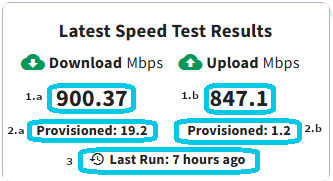
This card shows the last known download and upload speeds from a subscriber's network. Note: This information requires the subcriber be present in either Plume or Intellifi.
| # Number & Name | Description |
|---|---|
| #1.a: Latest Speed Test Download Result | Field showing the download speed result of the last run speed test for a given service, in Mbps. |
| #1.b: Latest Speed Test Upload Result | Field showing the upload speed result of the last run speed test for a given service, in Mbps. |
| #2.a: Provisioned Download Rate | Field showing the provisioned download speed of the given service in Mbps, if data is available. |
| #2.b: Provisioned Upload Rate | Field showing the provisioned upload speed of the given service in Mbps, if data is available. |
| #3: Time Since Last Test | Field showing the amount of time that has passed since the last speed test was completed. |
Action Center
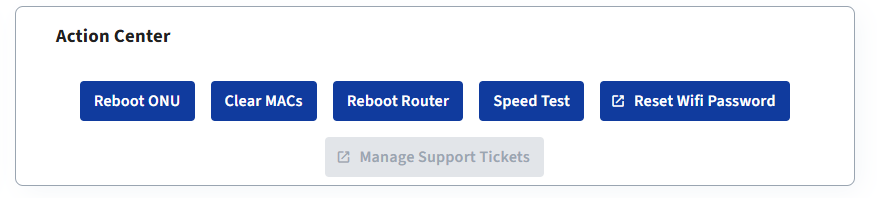
The Action Center presents key functions that can assist when troubleshooting a subscriber issue. Buttons with the square icon denote links to other applications. For example, the reset wifi password button opens a new browser tab to the appropriate place in either Plume Frontline or Intellifi MeshView. The four supported actions are Reboot Circuit/ONU, Clear MACs, Reboot Router, Speed Test, Reset Wifi Password (link), and Manage Support Tickets (link). Below is a table with more information about each action.
| Action | Description | Supported Services |
|---|---|---|
| Reboot Circuit/ONU | For fiber circuits, reboots the subscriber's CPE. For copper, resets the port. Requires appropriate integration user permissions - contact Adtran support to enable. | Mosaic Subscriber Insight |
| Clear MACs | Clears the learned MACs for an ONT. Use this to force equipment to relearn connected devices. This action could cause a shrot service interruption. | Mosaic Subscriber Insight (TA5000 Only) |
| Reboot Router | Reboots the subscriber's router. | Intellifi, Plume, Device Manager |
| Speed Test | Runs a speed test leveraging Intellifi or Plume, if available. For DM services, provides a link to DM. | Intellifi, Plume, Device Manager |
| Reset Wifi Password (link) | Provides a link to the appropriate view in either Plume Frontline or Intellifi MeshView. For DM services, a top level link is provided. | Intellifi, Plume, Device Manager |
| Manage Support Tickets (link) | Provides a link to the ticket management view in Mosaic Subscriber Insight, if synced with ticketing system | Mosaic Subscriber Insight (Must be synced with ticketing system) |