Circuit Tab
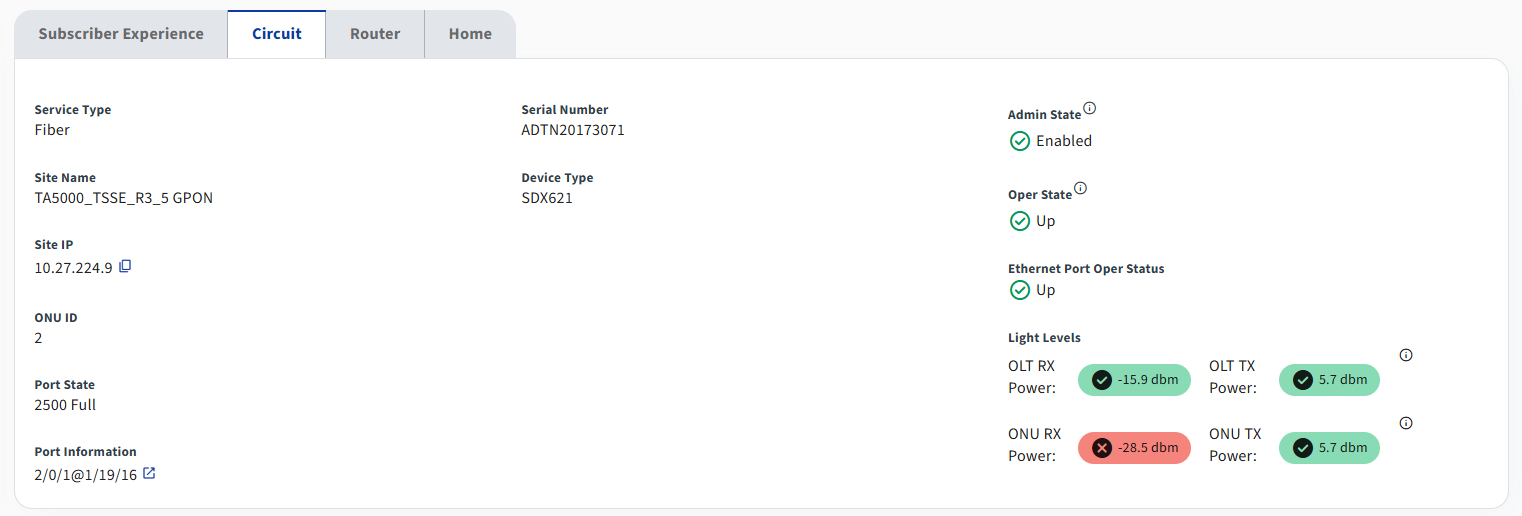
Select the Circuit tab to display the following information regarding the access network:
| Field Name | Description |
|---|---|
| Service Type | The type of service this subscriber is receiving. Some service types such as cable do not have much information to show. |
| Site Name | The name of the site that services this subscriber's service. |
| Site IP | The management IP address of the site. |
| ONU ID | The ONU ID associated with this subscriber. Select the  icon to view ONU details. icon to view ONU details. |
| Port Information | Similar to the interface, this field provides a full description of the port. In general, this field is most useful in SDX deployments. |
| Serial Number | The serial number of the CPE equipment. Often times, this is the ONU serial number. |
| Device Type | The type of CPE equipment. For fiber deployments, this is the ONU. |
| Admin State | Displays the administrative status of the CPE equipment. The admin state will be one of the following: In-service, Out of service, Out of service - Maintenence, Out of service - Unassigned, Unknown. |
| Oper State | Displays the operational state of the CPE equipment. The oper state will be one of the following: Up, Down, Discovering, Test, Unknown. |
| Ethernet Port Oper Status | Displays the operational state of the ethernet port. |
| BIP Errors | Displays the number of BIPs from Operate data. |
| Light Levels | Shows the fiber optic light levels of the subscriber's circuit. Statistics include the following: OLT RX Power, OLT TX Power, ONU RX Power, ONU TX Power. |